01
Check before payroll
The system shows what is missing before approval: a missing or invalid IBAN, a missing ID number, or a negative net. Payroll is not approved while a block remains.

From clock-in to payslip
Taqam is an HR and payroll system for Saudi establishments. It records attendance, calculates payroll and social insurance, prepares the Wage Protection file, explains each employee’s payslip, and alerts you before residencies and licences expire.
From 99 SAR per month for ten employees. You can export all your data at any time.
Before approval
The aim is a clean payroll at month-end, and that every employee understands what they received.
The system shows what is missing before approval: a missing or invalid IBAN, a missing ID number, or a negative net. Payroll is not approved while a block remains.
A salary certificate or experience letter with a reference number and a QR code. Any party can open the verification page without an account, and confirm that the letter is genuine or has been revoked.
Before a raise, a hire, or replacing an employee with a Saudi, you see the effect on monthly cost, social insurance and the Saudization band, from your establishment’s data.
Features
The basics a small or mid-sized establishment needs to run HR without spreadsheets.
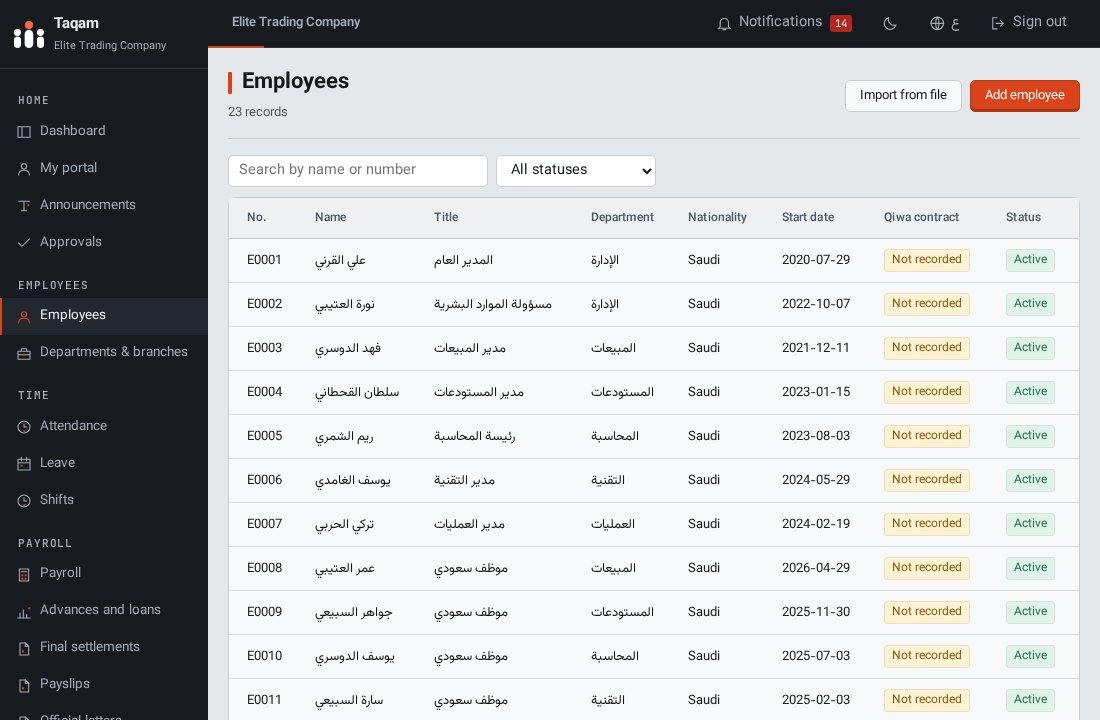
ID, residency, IBAN, contracts and salary history, with departments, branches and permissions by role.
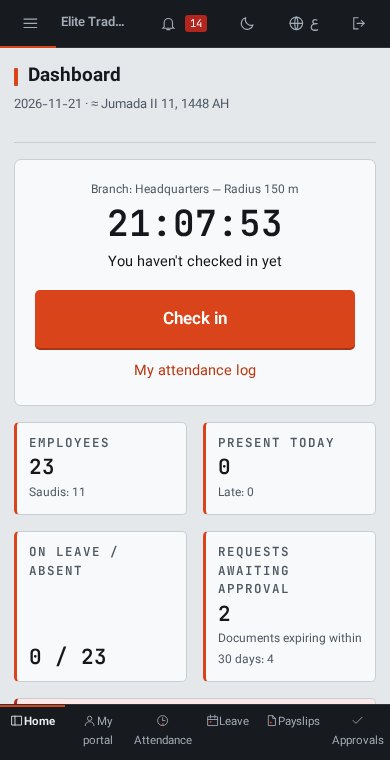
Clock in from a phone inside the branch radius, or by scanning a code that changes every minute. It works offline and syncs when the connection returns.
Annual and sick leave balances under the Labour Law, and multi-step approval paths for each establishment.
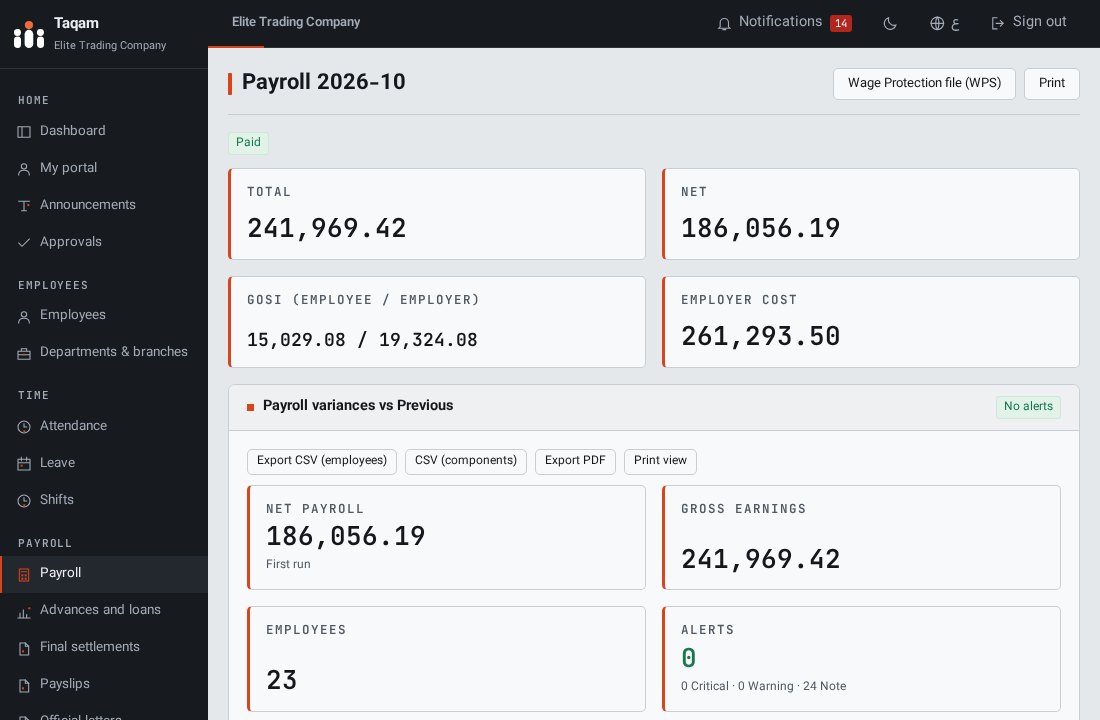
Allowances, deductions, overtime, absence and lateness, the employee and employer shares of social insurance, and a payslip for each employee.
After payroll is approved we check the IBAN, ID number and that pay matches the net, then you download the file in the ministry’s format. You give it to your bank to return stamped, and you upload it to Mudad.
End-of-service award under articles 84, 85 and 87, leave settlement and the final settlement, plus the establishment’s accrued liability.
Residencies, passports, medical insurance and the commercial registration. They appear in the compliance centre 90 days before expiry, and you get alerts 30, 14 and 7 days before.
A weekly roster and shift swaps between colleagues. We reject any assignment that breaks working hours or rest rules.
Every change is recorded with who made it, and the log is chained so a later alteration is detectable.
Screens
Screenshots from sample data: a calm interface in English, left-to-right, and it works on a phone.
Roles
Six ready-made roles with clear permissions, which you can change in settings.
Every screen, plus settings, the subscription and the audit log.
Employees and contracts, attendance, leave, documents and shifts.
Payroll and advances, the Wage Protection file, and the compliance centre.
Read-only access to payroll, reports and the compliance centre, with no edits.
The team’s attendance, request approvals and the shift roster.
Clock-ins, leave, payslips, letters and advances from one portal.
Getting started
Three steps from subscription to the first payroll.
Your establishment is created automatically, and you receive an activation code for the owner account to enter on the sign-in page.
By hand or by importing a CSV from your current system. A preview shows the result before you save.
Employees clock in and request leave, and at month-end you calculate payroll, approve it and download the Wage Protection file.
What sets it apart
Tools designed to explain the figures, not to hide them.
A salary certificate or experience letter issued with a reference number and a QR code, which any party can verify without an account. The verification page does not show the salary or the ID number.
On the payslip the employee sees, in figures, why each difference from last month arose: absence, lateness, overtime or a change in an allowance.
Try a raise, a hire, a termination or a replacement with a Saudi, and see the effect on cost, social insurance, end-of-service liability and the Nitaqat band before you decide.
Shift swaps are checked against the Labour Law before they reach the manager, not after a breach.
A shared device, an implausible move, a doubtful location and an offline clock-in appear as flags for review, and do not stop the employee from clocking in.
A full export in JSON and CSV, including your uploaded files, works even after the subscription ends. When it ends your account stays read-only and we do not delete your data.
In plain terms
We prefer that you know the limits before you subscribe.
Payroll, social insurance and overtime calculations, preparing the Wage Protection file with a pre-check, the final settlement and end-of-service quittance under the Labour Law, a payslip that explains changes, verifiable letters, attendance from a phone, and a full export of your data.
Sending the file to the bank and uploading it to the Mudad platform, the bank’s confirmation of the format, registering employees with social insurance, and dealing with Qiwa and Muqeem. Direct integration with these authorities is being prepared, and we will not announce it before it works and is officially approved.
The calculation is based on Labour Law articles and rates you can change in settings. It is an aid, and the final review remains with the accountant or a specialist adviser.
Pricing
In Saudi riyals per month, with no minimum headcount and no setup fee. The final price is confirmed and billed when you subscribe through Codifica Hub.
FAQ
No. The Starter plan begins with one employee, and includes ten employees at a fixed price.
No. We prepare the file in the Ministry of Human Resources’ format after a pre-check of the IBAN, ID and pay match, and you download it and give it to your bank to return stamped, then you upload it to Mudad as the bank requires. Direct integration with Mudad, social insurance and Qiwa is being prepared, and is not enabled until the official authorities approve it.
Yes: 14 free days are added to your subscription period after payment. There is no trial before payment, and the service starts after you subscribe. Your data remains yours and can be exported at any time.
The calculation is based on the Law’s articles and rates you can change in settings. It is an aid, and the final review remains with the accountant or a specialist adviser.
Each establishment has a separate identifier in every table, and the database itself enforces isolation, so a query cannot read another establishment’s data even if the application errs.
The establishment enters a read-only grace period, and your data stays stored and exportable until you renew. We delete nothing.
Yes. It is a web app you can install on the home screen, and it supports clocking in offline.
Yes. Import the employees file as CSV, and Taqam recognises common column names in Arabic and English.
Your data is yours and can be exported at any time, and we delete nothing.